
The FGen Program, version 2.00
 |
 |
 |
 |
 |
 |
 |
 |
 |
 |
 |

Try DAP Measurement Studio (DAPstudio). DAPstudio supports all the functionality of FGen in an integrated data acquisition package.
DAPtools Standard Package includes... |
|---|
Analog inputs often contain unwanted frequency components. All unwanted frequencies below half the sampling rate can be removed by digital filters. The DAPL operating system has built-in commands to perform filtering on acquired data. The DAPL filtering commands implement Finite Impulse Response (FIR) filters by applying vectors of coefficients, called filter vectors, to acquired data. (To implement the classic filter responses - Bessel, Butterworth, Chebyshev, Elliptic, and inverse Chebyshev - in DAPL, use the DAPL IFM.)
The FIRFILTER command accepts four different data types: WORD, LONG, FLOAT, or DOUBLE. FGen for Windows 2.00 supports generation of vectors for these data types.1
The filter generation program, FGen for Windows, version 2.00, allows design of multiple filters for use with the DAPL FIRFILTER command. It includes support for Kaiser windowing, an option for automatic DC normalization for low-pass filters (this 30kB graphic illustrates the difference), live view of filter coefficient changes, new filter vector data types, cut/paste of filter designs, and a display layout much like DSCview's filter design window.
|
|
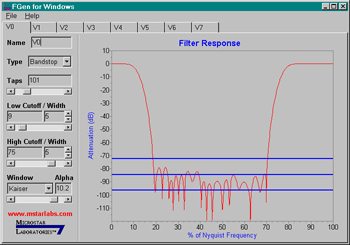
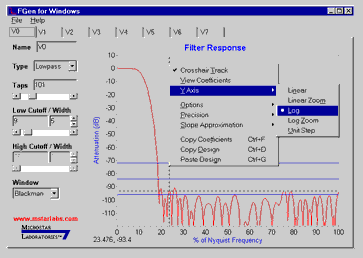
The earlier version, FGEN for Windows 1.01, is included with each DAP shipment with the DAPtools Basic software package. It can produce several filter types: lowpass, highpass, bandpass, bandstop, and running average, with Blackman, Hamming, and Hanning windowing. FGen also provides plots of filter response as dB vs. frequency and as amplitude vs. frequency.
Try FGen for Windows, version 1.01, included in DAPtools Basic, then order DAPtools Standard with your DAP board purchase to receive the complete FGen for Windows, version 2.00.
Learn about the differences in response characteristics when using 32-bit coefficients vs. 16-bit coefficients.
Return to the Software page.
1 The program gives options for WORD, LONG, and FLOAT. The FLOAT option may be used for DOUBLE vectors.