
DAPcell Software
 |
 |
 |
 |
 |
 |
 |
 |
 |
 |
 |
Your network access tools for data acquisition
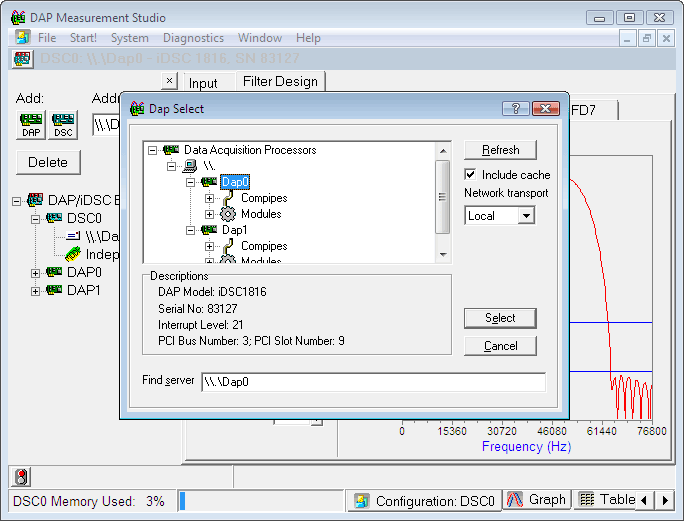
DAPcell is the central hub for DAP activity on each host system. DAPcell services are configured through the Data Acquisition control panel application installed by every DAPtools version.
There are four server versions, providing different degrees of access.
- DAPcell Basic Server – in
DAPtools Basic
Supports local host access only – the DAP board cannot be seen across the local network. - DAPcell Local Server – in
DAPtools Standard
Adds features for direct disk feeds and data logging, for highly optimized transfers without intervention by application software – but still no network visibility. - DAPcell Server – in
DAPtools Professional
Provides full network services, allowing a DAP board to be visible over a local network. - DAPcell Client – in
DAPtools Professional
Omits server features, for the special situation that no DAP is available in the local station.
Data buffering services and device driver functions supported by DAPcell are always available and always isolated. There is no direct access to these functions from application software.
What you get with DAPtools Standard
High-speed at-the-server disk logging is a strength of the DAPcell Server. A benchmark performed in late 2001 showed that a single server can acquire and log data to disk at a sustained rate of 8.2M samples/sec. A client PC anywhere on the network can request this service from several (optionally synchronized) servers for aggregate logging rates of more than 80M samples/sec.
What you get with DAPtools Professional
Network Access for Data Acquisition and Control
With DAPcell Network Server software, a Windows service, you can set up a number of DAPcell PCs on a network to fit the pattern of work cells and test cells in a factory, laboratory, or any other workplace.
DAPcell server software supervises one or more DAP boards in each PC it runs on. Each DAP – with external expansion in 19-inch industrial racks – can control several hundred channels of I/O from its own onboard intelligence.
DAPcell client software on a PC anywhere on a network lets you access and control any DAP on the network that DAPcell server software supervises.
So, with a Microstar Laboratories user interface like DAP Measurement Studio (DAPstudio); with any industry-standard interface like DASYLab or LabVIEW; or with a user interface you develop yourself, you select any DAP on your network as easily as you select a printer. You make the network transparent to your data acquisition application.
Networks and Real Time
Like Windows itself, Windows networks do not work as real-time systems. But if you need real-time data acquisition and control on a network, use DAPcell server software for local supervisory control of DAP boards on some or all PCs. DAPcell client software then allows network-wide user access and control of those DAPs from any PC.
Windows and Real Time
Windows uses up a lot of cycles on the PC platform, and when it takes control of the CPU it holds onto it for a long time in real time terms.
Measuring or controlling a real-time process needs processing power when it needs it, and not at some other time. Without computing power available at the right time, the system loses readings and corrupts measurements; or it lets a process run out of control. A DAP board solves this problem with onboard intelligence. Onboard intelligence deals up front with the critical parts of any application: the parts that run in real time.
Testing
A single DAPcell server PC can support up to 14 DAP or iDSC boards as standard. In a benchmark server configured to match customer hardware for the first shipment of DAPcell Server version 4.00, Microstar Laboratories used 4 boards, each with an overall data acquisition rate of 1228.8k samples per second, and logged to disk at the full acquisition rate: 4.9152M samples per second. With DAPcell Network Server, a single DAPcell client PC, requesting the disk logging service from 11 servers configured like the benchmark server, then can log to disk at an overall rate of 54.0672M samples per second.
In a more recent benchmark, Microstar Laboratories used 3 DAP boards, each
with an overall data acquisition rate of 1667k samples per second, or 5001k
samples per second for all three. The server PC logged 5M samples per second
with capacity to spare. On any DAP board, running the
DAPL REPLICATE command on the onboard
processor increases the apparent sample throughput. Doing this on just two of
the boards – or on all three – established 8.2M samples per second
as the maximum sustained disk-logging rate on the benchmark PC hardware. With
DAPcell Network Server, a single DAPcell client PC, requesting the disk logging
service from 11 servers configured like the benchmark server, then can log to
disk at an overall rate of more than 90M samples per second.
To find out more on how you can have network access and real-time data acquisition and control for your applications, contact us.
Return to the Software page.